
A controlled home for every controlled document
A procedure nobody has acknowledged is not a control. HaloEHS versions documents, routes them through up to five approval levels, records who acknowledged what, and brings them back for periodic review before they quietly go stale.
Document Management workflow
- Draft
- Approve, up to 5 levels
- Publish
- Acknowledge
- Periodic review
Version control, up to five approval levels, acknowledgments, periodic reviews, full-text search and QR sharing. A controlled home for every controlled document.
Document control fails in a specific way: the current version exists, but the people who need to follow it are working from the one they downloaded eighteen months ago. Nobody is being careless. The system simply had no way to know who had read what, or to notice that a procedure had drifted past its review date.
HaloEHS closes that loop. Approval is explicit and multi-level. Acknowledgment is recorded per person, so you can answer who has read the current revision rather than who was sent it. Periodic reviews bring documents back around on a schedule, and full-text search makes the current version easier to find than a stale local copy.
Document Management workflow
- Draft
- Approve, up to 5 levels
- Publish
- Acknowledge
- Periodic review
Document Management, the real screens
Live screenshots from a HaloEHS demo workspace. Personal details are blurred.
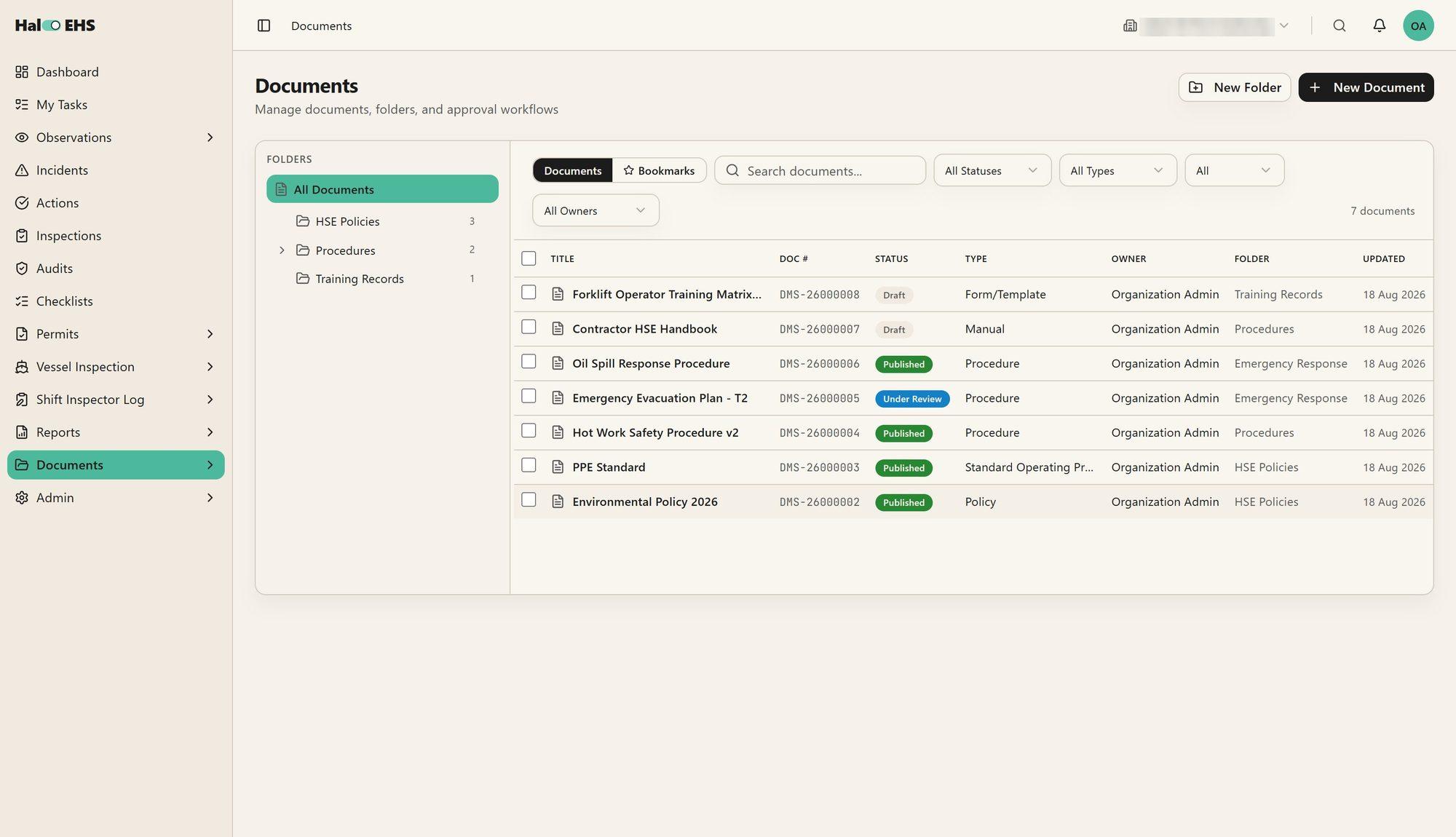
Document library with folder tree
Inside Document Management
- 01
Version control
Every revision is retained with its approval history, so the document in force on any past date is recoverable rather than inferred. - 02
Up to five approval levels
Approval workflows support one to five levels, configured per document type, enough to model most real sign-off chains without inventing a parallel process. - 03
Acknowledgments
Read acknowledgment is captured per person and per revision. You can answer who has acknowledged the current version, not merely who was notified. - 04
Periodic reviews
Documents return for review on a defined cycle, so a procedure cannot drift years past its review date without anyone noticing. - 05
Full-text search
Search across document content, not just titles. Finding the controlled copy has to be easier than reaching for a local one.
Document Management, feature by feature
Every capability that ships in the module today, on the same connected record as the rest of the platform.
Version control
Every revision is retained with its approval history, so the document in force on any past date is recoverable rather than inferred.
Up to five approval levels
Approval workflows support one to five levels, configured per document type, enough to model most real sign-off chains without inventing a parallel process.
Acknowledgments
Read acknowledgment is captured per person and per revision. You can answer who has acknowledged the current version, not merely who was notified.
Periodic reviews
Documents return for review on a defined cycle, so a procedure cannot drift years past its review date without anyone noticing.
Full-text search
Search across document content, not just titles. Finding the controlled copy has to be easier than reaching for a local one.
QR sharing
A QR code resolves to the current approved revision, which is what makes a printed copy on a noticeboard point at live content.
One workflow, start to close.
Every transition is permissioned and logged, so the record shows who moved it, when, and on whose authority.
- 01Draft
- 02Approve, up to 5 levels
- 03Publish
- 04Acknowledge
- 05Periodic review
Document Management record
- Draft
- Approve, up to 5 levels
- Publish
- Acknowledge
- Periodic review
Append-only. Every entry keeps who, when and on whose authority.
Acknowledgment is the part most systems skip
Plenty of tools store documents and version them. Far fewer record, per person and per revision, that someone has actually acknowledged the current text. That gap is where the real exposure sits: after an incident, the question is rarely whether a procedure existed. It is whether the people doing the work had seen the version in force.
Because acknowledgment is tracked per revision, publishing a new version does not inherit the acknowledgments of the old one. The obligation resets, which is the correct behaviour and the one most systems quietly get wrong.
Nothing here is a standalone tool.
Document Management shares one data layer with every other module. Findings become corrective actions, actions land in the same task inbox, and everything feeds the same dashboards and scheduled reports.

Audit Management
Plan, execute, and close EHS audits collaboratively. Multiple auditors work at once, external auditors get time-bound access, and findings trigger NCRs and CAPAs in one click.
Learn more
Action Management
Your command center for every CAPA across every module. Personalized task lists, automated reminders, evidence-based closure, and effectiveness tracking.
Learn moreInspections
Recurring inspection programmes built on versioned checklists, with perform, review and approve chains and findings that become tracked corrective actions.
Learn moreDocument Management, answered plainly.
No, and that is deliberate. Acknowledgment is recorded against a specific revision, so publishing a new version resets the obligation and the outstanding list repopulates. Carrying acknowledgments forward would let a material change to a procedure pass unread while the system still reported full compliance, which is worse than having no acknowledgment tracking at all.
One to five, configured per document type. Five covers the sign-off chains seen in practice, including cases where a technical author, a department head, an EHS reviewer, a site manager and a corporate function all need to approve in sequence.
See your operation in HaloEHS.
We will set the demo up around your sites, your business units and your language, not a canned dataset.