


Skip to content
hal
Module: Shift Operations

Shift logs that open and lock themselves

In continuous operations the handover is where information dies. HaloEHS creates the shift inspector log automatically at shift start and locks it at shift end, so the record reflects the shift rather than what someone remembered afterwards.

Overview

Shift inspector logs that open at shift start and lock themselves at shift end, with toolbox talks and a live shift feed. Built for terminals and continuous operations.

A shift log written at the end of a shift is a memory exercise. A shift log kept in a book that stays open indefinitely is not a record at all, because anyone can add to it later. Both failure modes are common, and both stay invisible until something goes wrong and the log is the only evidence of what was known and when.

HaloEHS closes both gaps mechanically. Logs are created by a scheduled job at shift start, not by a person. They lock shortly after shift end, also by a scheduled job. Between those two events the log is a live feed the whole team can see and add to, which is what makes it useful during the shift rather than only after it.

Shift Operations workflow

  1. Log opens at shift start
  2. Toolbox talk
  3. Live shift feed
  4. Log locks at shift end
In the product

Shift Operations, the real screens

Live screenshots from a HaloEHS demo workspace. Personal details are blurred.

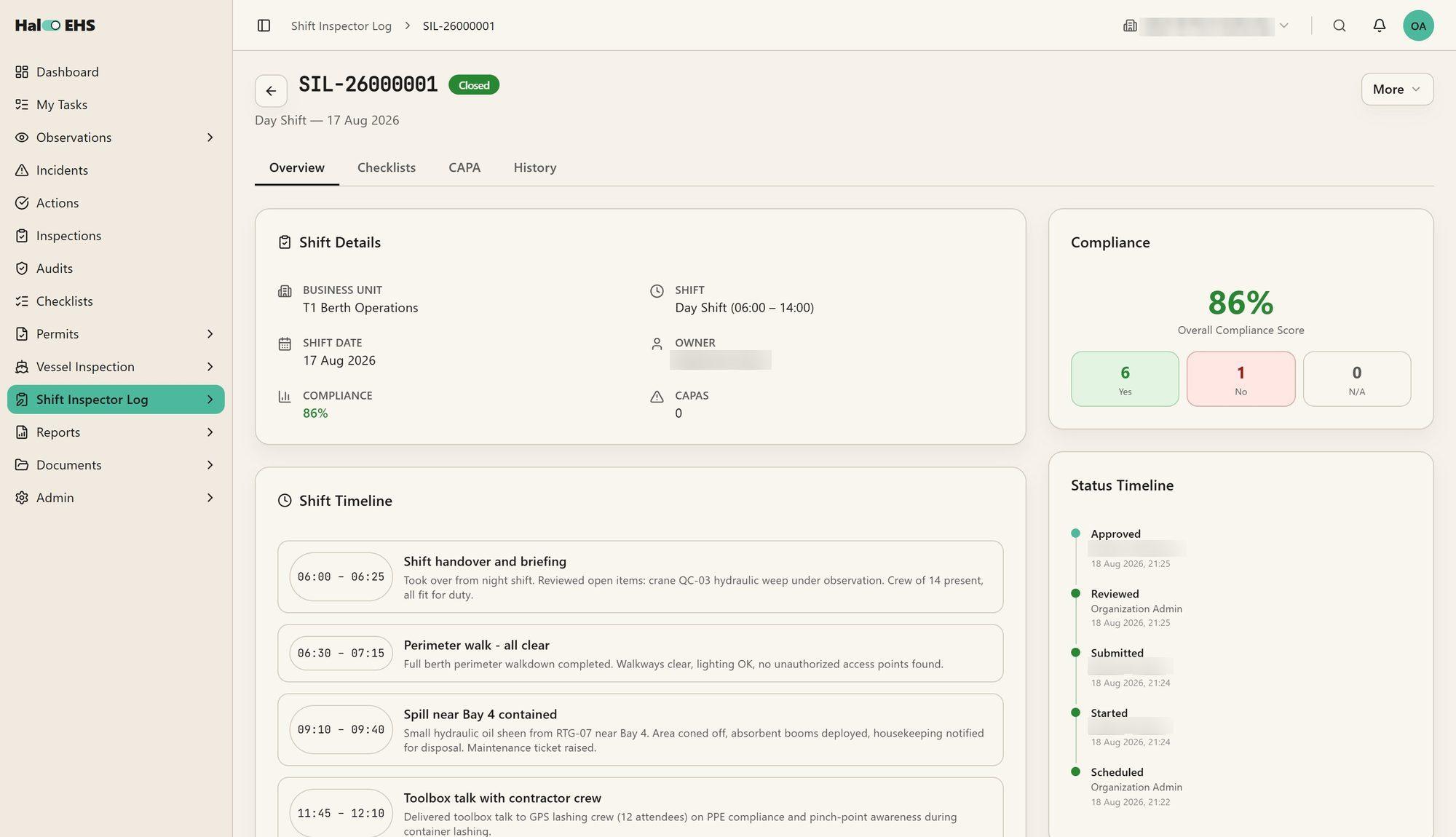
app.haloehs.com/shift-log/SIL-26000001
Closed shift log with its timeline, toolbox talk and compliance score

Closed shift log with its timeline, toolbox talk and compliance score

What it does

Inside Shift Operations

  1. 01

    Auto-created at shift start

    A scheduled job opens the inspector log for each shift. Nobody has to remember to start it, and there is no gap between the shift beginning and the record existing.
  2. 02

    Auto-locking at shift end

    The log locks shortly after the shift closes. Entries reflect the shift they describe, and late additions cannot quietly rewrite what was known at the time.
  3. 03

    Live shift feed

    Entries appear as the shift runs, so the incoming crew reads a current picture at handover instead of a summary written from memory.
  4. 04

    Toolbox talks

    Pre-shift briefings are recorded against the shift with attendance, so the talk that happened is part of the same record as the work that followed.
The workflow

One workflow, start to close.

Every transition is permissioned and logged, so the record shows who moved it, when, and on whose authority.

  1. 01Log opens at shift start
  2. 02Toolbox talk
  3. 03Live shift feed
  4. 04Log locks at shift end

Shift Operations record

  • Log opens at shift start
  • Toolbox talk
  • Live shift feed
  • Log locks at shift end

Append-only. Every entry keeps who, when and on whose authority.

Why this is a module and not a configured form

Most EHS platforms would deliver shift logs by configuring a generic form and asking you to remember to fill it in. That works until the shift where nobody does. The auto-create and auto-lock behaviour is the entire point: it makes the record independent of discipline, which is what a record has to be if it is going to carry weight later.

It also means the log is queryable the way everything else is. A shift log is not a PDF someone filed; it is structured data feeding dashboards, scheduled reports and investigations alongside incidents and permits.

Where it matters most

Built for these operations

Questions

Shift Operations, answered plainly.

It goes in as a new, separately timestamped entry rather than by editing the locked log. That distinction matters: the original record continues to show what was captured during the shift, and the late addition shows plainly as a late addition. Silently editable history is exactly what makes a log worthless as evidence, so HaloEHS does not offer it.

Yes. Shift timings and patterns are configured per business unit, which matters when a terminal runs a different rotation from a plant in the same organization. The auto-create and auto-lock jobs follow whatever pattern each unit is configured with.

Next step

See your operation in HaloEHS.

We will set the demo up around your sites, your business units and your language, not a canned dataset.