
Skip to content
hal
Module: Inspections

Checklists on a schedule, with a review chain behind them

An inspection nobody reviews is a photograph of a problem. HaloEHS runs inspections as programmes: scheduled, performed, reviewed, approved, and closed out through corrective actions that someone owns.

Overview

Recurring inspection programmes built on versioned checklists, with perform, review and approve chains and findings that become tracked corrective actions.

Most inspection tooling stops at capture. A checklist gets filled in, a photo gets attached, and the record sits in a folder until someone goes looking for it. The failure is not the capture step, it is everything after: nobody reviews, nothing is raised, and the same finding reappears next quarter.

HaloEHS treats an inspection as a workflow with a defined end state. Schedules create the inspections. Templates come from the versioned checklist builder, so a completed inspection always shows the questions that were actually asked rather than the ones the template asks today. Review and approval chains mean a second person sees the result. Findings raise corrective actions that land in the same task inbox as everything else.

Inspections workflow

  1. Schedule
  2. Perform
  3. Review
  4. Approve
  5. Findings to actions
In the product

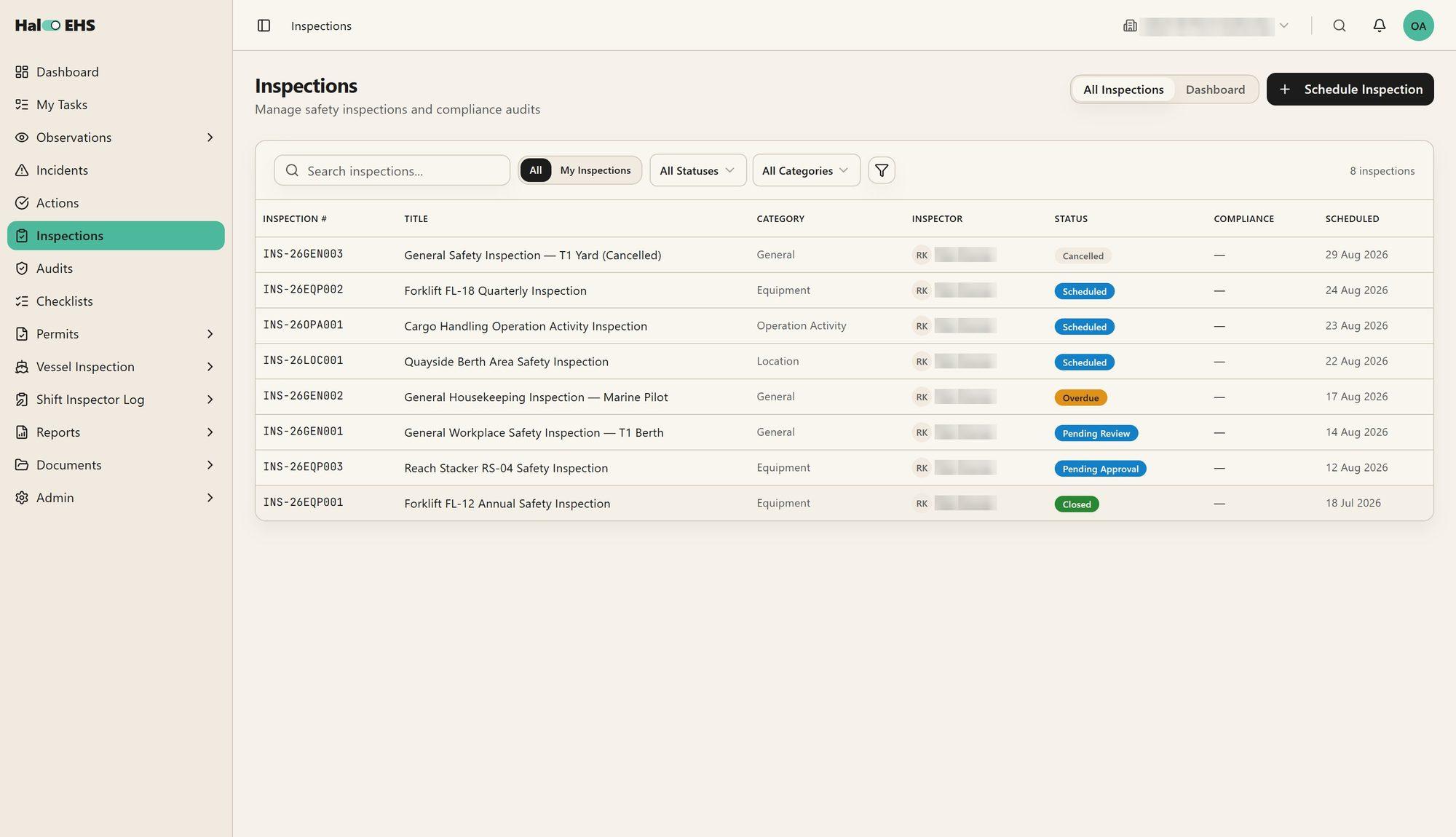
Inspections, the real screens

Live screenshots from a HaloEHS demo workspace. Personal details are blurred.

app.haloehs.com/inspections
Inspection register with recurrence and compliance columns

Inspection register with recurrence and compliance columns

What it does

Inside Inspections

  1. 01

    Versioned checklist builder

    One template system shared with audits, permits and shift logs. Templates are versioned, so historical records stay faithful to the checklist in force at the time.
  2. 02

    Recurring schedules

    Daily, weekly, monthly or custom cycles generate the inspections automatically. Nothing depends on someone remembering.
  3. 03

    Perform, review, approve

    Each stage is permissioned and logged. A result is not final because the inspector pressed submit; it is final when the reviewer approves it.
  4. 04

    Findings become actions

    A failed item raises a corrective action with an owner and a due date, tracked to verified closure in the unified My Tasks inbox.
  5. 05

    Printable records

    Every completed inspection generates a system PDF, so the evidence a regulator or customer asks for is an export rather than a reconstruction.
Every capability

Inspections, feature by feature

Every capability that ships in the module today, on the same connected record as the rest of the platform.

Versioned checklist builder

One template system shared with audits, permits and shift logs. Templates are versioned, so historical records stay faithful to the checklist in force at the time.

Recurring schedules

Daily, weekly, monthly or custom cycles generate the inspections automatically. Nothing depends on someone remembering.

Perform, review, approve

Each stage is permissioned and logged. A result is not final because the inspector pressed submit; it is final when the reviewer approves it.

Findings become actions

A failed item raises a corrective action with an owner and a due date, tracked to verified closure in the unified My Tasks inbox.

Printable records

Every completed inspection generates a system PDF, so the evidence a regulator or customer asks for is an export rather than a reconstruction.

Works on the device they carry

Opens in the browser on any phone or tablet. No app store, no install, no IT ticket to onboard a contractor for a single walkthrough.

The workflow

One workflow, start to close.

Every transition is permissioned and logged, so the record shows who moved it, when, and on whose authority.

  1. 01Schedule
  2. 02Perform
  3. 03Review
  4. 04Approve
  5. 05Findings to actions

Inspections record

  • Schedule
  • Perform
  • Review
  • Approve
  • Findings to actions

Append-only. Every entry keeps who, when and on whose authority.

Why versioned templates matter more than they sound

Checklists change. A question gets reworded, a section is added after an incident, a regulatory update forces a new item. If the template is mutable, every historical record silently changes meaning with it, and an auditor sampling inspections from last year is reading this year questions against last year answers.

Versioning removes that problem. The inspection completed in March is permanently attached to the March template. You can see what changed, when, and who changed it, which is exactly the chain of custody an external auditor expects to follow.

Inspections and audits share one engine

Inspections and audits are different programmes with different cadences, but they are the same machinery: templates, schedules, execution, review, findings, actions. HaloEHS implements that once. Learning the inspection flow means you already know the audit flow, and a finding behaves identically whichever one raised it.

Where it matters most

Built for these operations

Questions

Inspections, answered plainly.

They share the same checklist builder and the same findings-to-actions path, but they are built for different rhythms. Inspections are high-frequency and usually single-inspector: a daily walkthrough, a weekly equipment check, a pre-shift verification. Audits are programme-level, often multi-auditor and multi-section, with formal planning and closure stages and support for time-bound external auditor access. Teams typically run many inspections against a handful of audits per year.

Yes, and that is the default shape. The perform, review and approve stages are separate and separately permissioned, so the person who walked the floor is not the person who signs off the result. Each transition is logged with the user identity and timestamp, which is what makes an inspection record defensible rather than simply present.

It raises a corrective action with an owner and a due date. That action appears in the same My Tasks inbox as corrective actions from incidents, audits and permits, with overdue tracking, and closure requires evidence rather than a checkbox. The finding and the action stay linked, so you can trace any action back to the inspection item that caused it.

Next step

See your operation in HaloEHS.

We will set the demo up around your sites, your business units and your language, not a canned dataset.