

Skip to content
hal
Module: Reports & Analytics

Your safety meeting, pre-assembled

The monthly EHS pack should not cost two days of somebody exporting spreadsheets. Build the report once, put it on a schedule, and it arrives as PDF or Excel with run logs proving it actually went out.

Overview

A report builder with favourites, scheduled PDF and Excel delivery, per-module dashboards, and run logs with retry. Your safety meeting, pre-assembled.

Reporting is where a connected data layer either pays off or reveals that it was never connected. If observations, incidents, inspections, audits, permits and actions live in one model, a question spanning them is a query. If they do not, it is a week of manual reconciliation and the answer is stale by the time it arrives.

HaloEHS assumes the first case. Dashboards render live from the same records the workflows write, and the reporting engine turns any saved view into a scheduled delivery with a delivery record behind it.

Reports & Analytics workflow

  1. Build report
  2. Save as favourite
  3. Schedule
  4. Deliver PDF or Excel
  5. Run log with retry
In the product

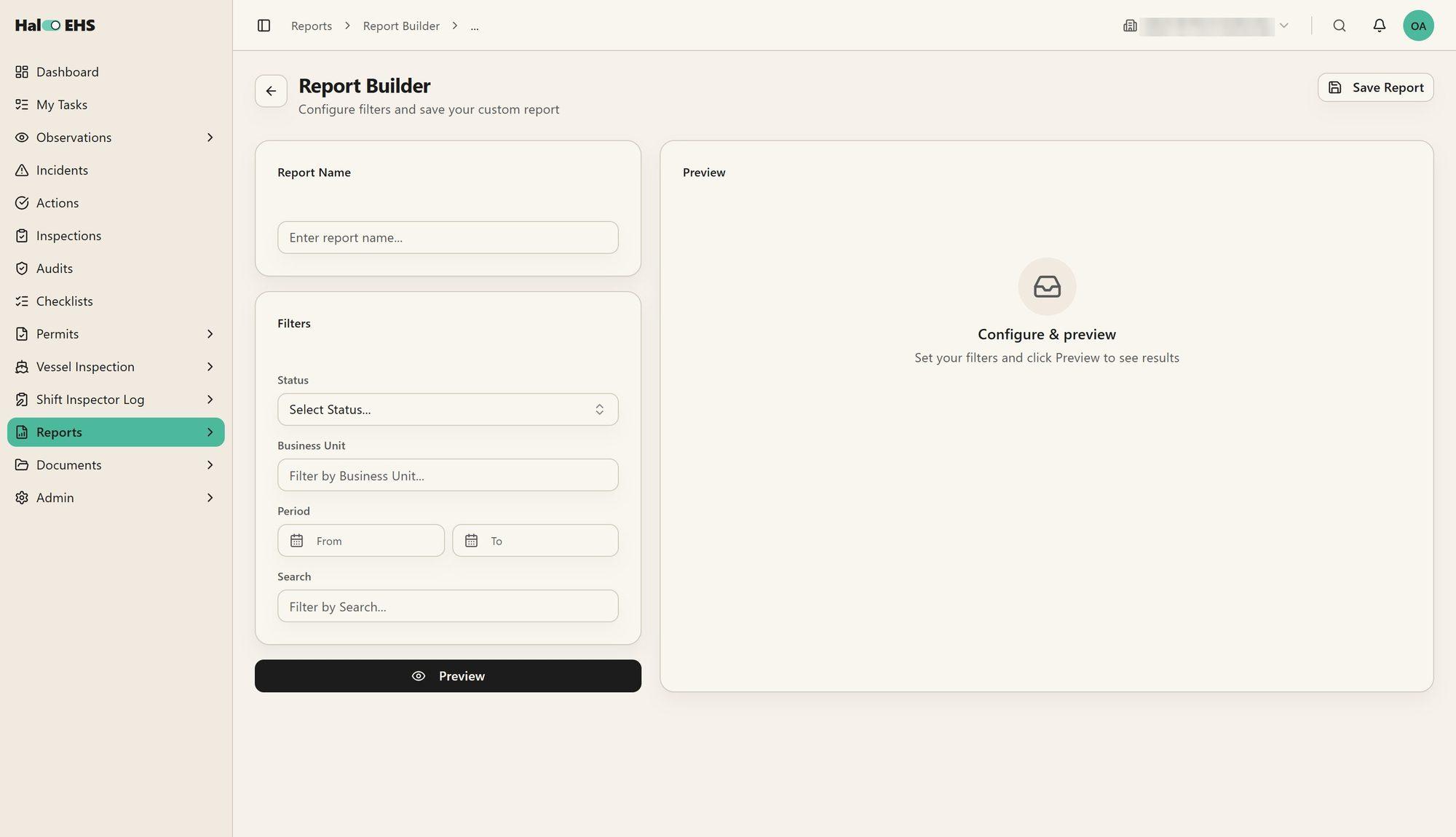
Reports & Analytics, the real screens

Live screenshots from a HaloEHS demo workspace. Personal details are blurred.

app.haloehs.com/reports/builder
Report builder with filters and live preview

Report builder with filters and live preview

What it does

Inside Reports & Analytics

  1. 01

    Report builder with favourites

    Compose a report once and favourite it. The definition is saved, so next month is a delivery rather than a rebuild.
  2. 02

    Scheduled PDF and Excel delivery

    Reports go out on a cron schedule by email, in the format the recipient actually opens.
  3. 03

    Per-module dashboards

    Live KPIs on the home screen with per-module charts underneath, so leading and lagging indicators sit in the same view.
  4. 04

    Run logs with retry

    Every scheduled delivery writes a run log and retries on failure. A report that did not send is visible rather than silently missing.
The workflow

One workflow, start to close.

Every transition is permissioned and logged, so the record shows who moved it, when, and on whose authority.

  1. 01Build report
  2. 02Save as favourite
  3. 03Schedule
  4. 04Deliver PDF or Excel
  5. 05Run log with retry

Reports & Analytics record

  • Build report
  • Save as favourite
  • Schedule
  • Deliver PDF or Excel
  • Run log with retry

Append-only. Every entry keeps who, when and on whose authority.

Run logs are not a minor detail

A scheduled report that silently fails is worse than no scheduled report, because everyone downstream assumes no news is good news. Delivery is tracked with a run log and automatic retry, so a failure is a visible event with a record attached rather than an absence nobody notices until a board meeting.

What makes prediction possible later

The AI features that exist today are assistive: suggested titles, predicted risk categories, recurrence flags. Anything more ambitious depends entirely on the quality and connectedness of the underlying record. Reporting is where that becomes measurable, because a report that can trace a hazard through to a verified corrective action is evidence the data layer is genuinely joined up.

Where it matters most

Built for these operations

Questions

Reports & Analytics, answered plainly.

Scheduled reports are delivered by email, so recipients do not need to log in to receive the pack. Anyone who needs to explore beyond the delivered report, rather than simply read it, needs an account with appropriate role and business-unit scoping, because the underlying data is access-controlled on every request.

Yes. Dashboards and reports are scoped the same way every other request is: by role permissions and by the business-unit hierarchy. A site manager sees their sites. A corporate EHS lead sees the roll-up. The same query run by two people can legitimately return different totals, because each is scoped to what that person is permitted to see.

Next step

See your operation in HaloEHS.

We will set the demo up around your sites, your business units and your language, not a canned dataset.